
 TRUCK SOFTWARE






 CLAAS
CLAAS CNH
CNH





 HITACHI



 JPRO
JPRO KUBOTA
 MAGIC TUNER
 MANITOU
 NEXIQ
NEXIQ NONSELF
 PACCAR


 PSI POWERLINK







 ZF TESTMAN


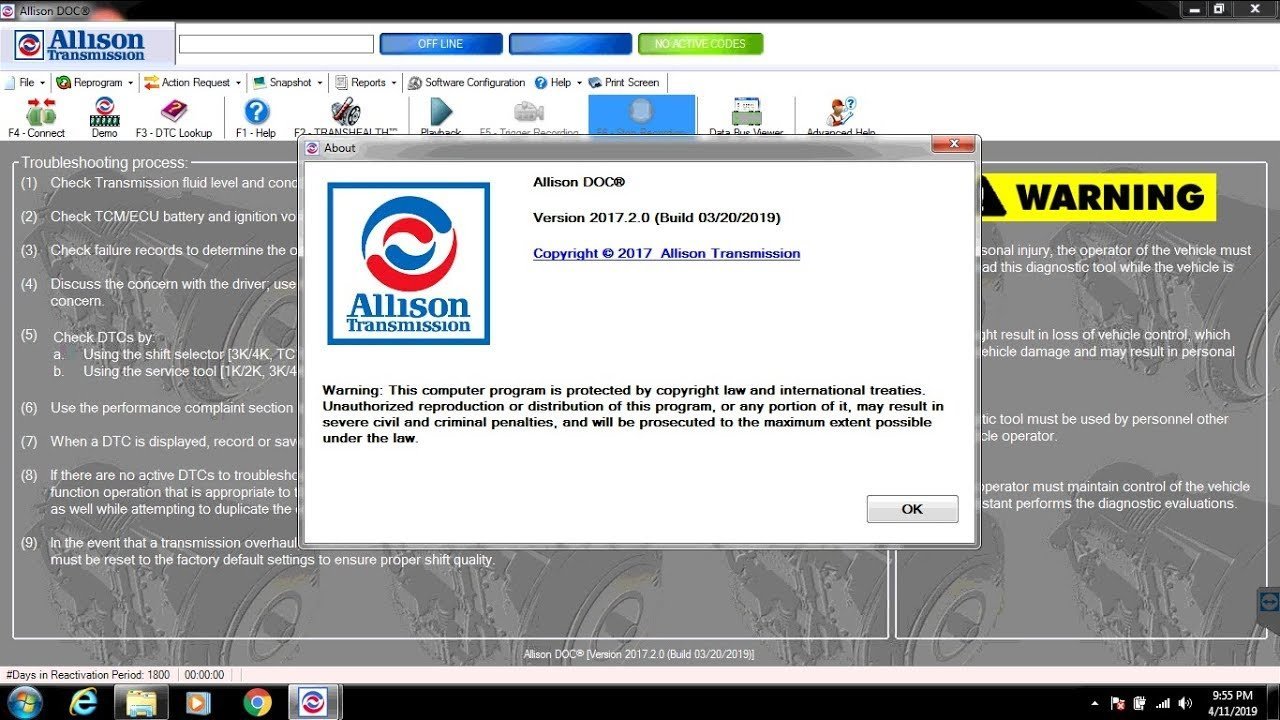


allison DOC 2017 Diagnostic Software: Key Features and Benefits
Allison DOC 2017 Diagnostic Software is a vital tool for diagnosing and reprogramming Allison Transmission systems. Designed for technicians, it offers real-time monitoring and advanced diagnostic capabilities tailored for heavy machinery and commercial trucks. This software is compatible with various Windows operating systems and requires specific hardware specifications. Installation can be completed remotely via TeamViewer, ensuring efficient setup and ongoing support.
Table of Contents
ToggleFeatures and Functionalities of Allison DOC 2017
This software offers an array of advanced features designed for efficient diagnostics and maintenance of Allison transmissions. Key functionalities empower technicians with tools for real-time monitoring and data management.
Diagnostic Tools and Real-Time Monitoring
The software incorporates a robust set of diagnostic tools that enable real-time vehicle analysis. These features facilitate quick detection of issues and allow for proactive maintenance.
Viewing Transmission Control Module Data
Accessing the Transmission Control Module (TCM) data provides critical insights into vehicle performance and operational parameters. This information is essential for ensuring optimal performance.
Troubleshooting and Fault Code Analysis
Efficient troubleshooting capabilities include fault code analysis that simplifies problem identification. Technicians can quickly determine corrective actions, thus minimizing downtime.
Reprogramming and Software Updates
Reprogramming functionalities streamline the process of adjusting control parameters for enhanced vehicle efficiency.
Activation and Reactivation Process
The activation process is user-friendly and allows for seamless reactivation when necessary, ensuring that the software remains up to date with the latest features.
Receiving Updates and Support
Ongoing support includes regular updates, ensuring that users have access to the latest diagnostic information and features, which enhances overall functionality.
Data Collection and Reporting
Data collection capabilities allow for comprehensive analysis and reporting, further improving diagnostic accuracy and maintenance procedures.
Generating and Exporting Diagnostic Reports
Generating detailed diagnostic reports aids in documenting service history and provides valuable insights for future maintenance tasks.
Use of TRANSHEALTH™ Monitoring Tools
The TRANSHEALTH™ monitoring tools enable continuous assessment of transmission health, promoting early detection of potential issues.
Training Materials and User Assistance
Integrated training materials enhance user proficiency in utilizing the software effectively. These resources are crucial for maximizing software benefits.
Integrated Training Videos and Manuals
Access to training videos and manuals supports rapid learning and application of diagnostic techniques, making the tool accessible for users of varying skill levels.
Accessing Support and Troubleshooting Guidance
Comprehensive troubleshooting guidance is readily available, aiding users in resolving issues swiftly and efficiently.
Understanding the system requirements and installation process is crucial for ensuring a smooth setup of the software.
System Requirements and Installation Process
Hardware and Software Specifications
To run the software effectively, specific hardware and software specifications must be met:
- Compatible Windows Operating Systems: The software is designed to operate on Windows 10 for optimal functionality. Older versions may not provide full compatibility.
- USB Port and Connection Recommendations: A minimum of one USB port is necessary for installation, along with stable internet connectivity for updates and activation.
Installation via TeamViewer
Utilizing TeamViewer allows for remote installation, simplifying the setup process.
Prerequisites for Remote Installation
Before the installation process can begin, ensure that TeamViewer is installed on the target computer. The user should have administrative privileges ready for activation.
Step-by-Step Guide to Installing Allison DOC 2017
Follow these steps for a successful installation:
- Download the installation package from the official source.
- Open TeamViewer and connect to the computer that will host the installation.
- Run the installation file provided.
- Complete the installation by following the on-screen prompts.
User Privileges and Security Considerations
Security and proper privileges are essential for smooth operation.
Administrative Privileges for Activation
The software requires administrative access during the activation process to ensure proper configuration and security standards. Without these privileges, complete functionality cannot be guaranteed.
Privacy Policy Terms and Compliance
Users should be aware of privacy policy terms outlined during installation. Understanding these terms ensures compliance with software usage and protects user data throughout the operation.
Compatibility and Use Cases
Understanding the compatibility and variety of use cases for Allison DOC 2017 is essential for maximizing its effectiveness in different applications.
Supported Allison Transmission Product Families
This software supports various product families, making it versatile for a range of vehicles and machinery.
5th and 6th Generation Controls
Allison DOC 2017 is compatible with both 5th and 6th generation transmission controls. This allows technicians to perform diagnostics and make adjustments on the latest models, ensuring optimal performance.
Off Highway and On-Road Applications
The diagnostic software is suitable for both off-highway and on-road vehicles. This flexibility makes it a valuable tool for fleet management in diverse industries.
Use with Electronic Control Units (ECUs)
The software seamlessly interfaces with various Electronic Control Units, enhancing diagnostic capabilities.
Diagnostic Optimization for WTEC III ECUs
For WTEC III ECUs, users benefit from diagnostic optimization, enabling precise troubleshooting and efficient management of transmission systems.
RP1210C Compliant Communications
Allison DOC meets RP1210C standards, ensuring compatibility with industry-standard diagnostic tools and facilitating connected communications across different software platforms.
Integration with Other Diagnostic Tools and Software
This product integrates well with other diagnostic software solutions, enhancing its utility in diverse technical environments.
Allison DOC Premium vs. Standard Version
The premium version offers additional features compared to the standard version, making it ideal for specialized applications.
Compatibility with Third-Party Equipment
It is also compatible with various third-party equipment, allowing users to maximize their existing assets and streamline diagnostic processes.


