TRUCK SOFTWARE






 CLAAS
CLAAS CNH
CNH





 HITACHI



 JPRO
JPRO KUBOTA
 MAGIC TUNER
 MANITOU
 NEXIQ
NEXIQ NONSELF
 PACCAR


 PSI POWERLINK







 ZF TESTMAN



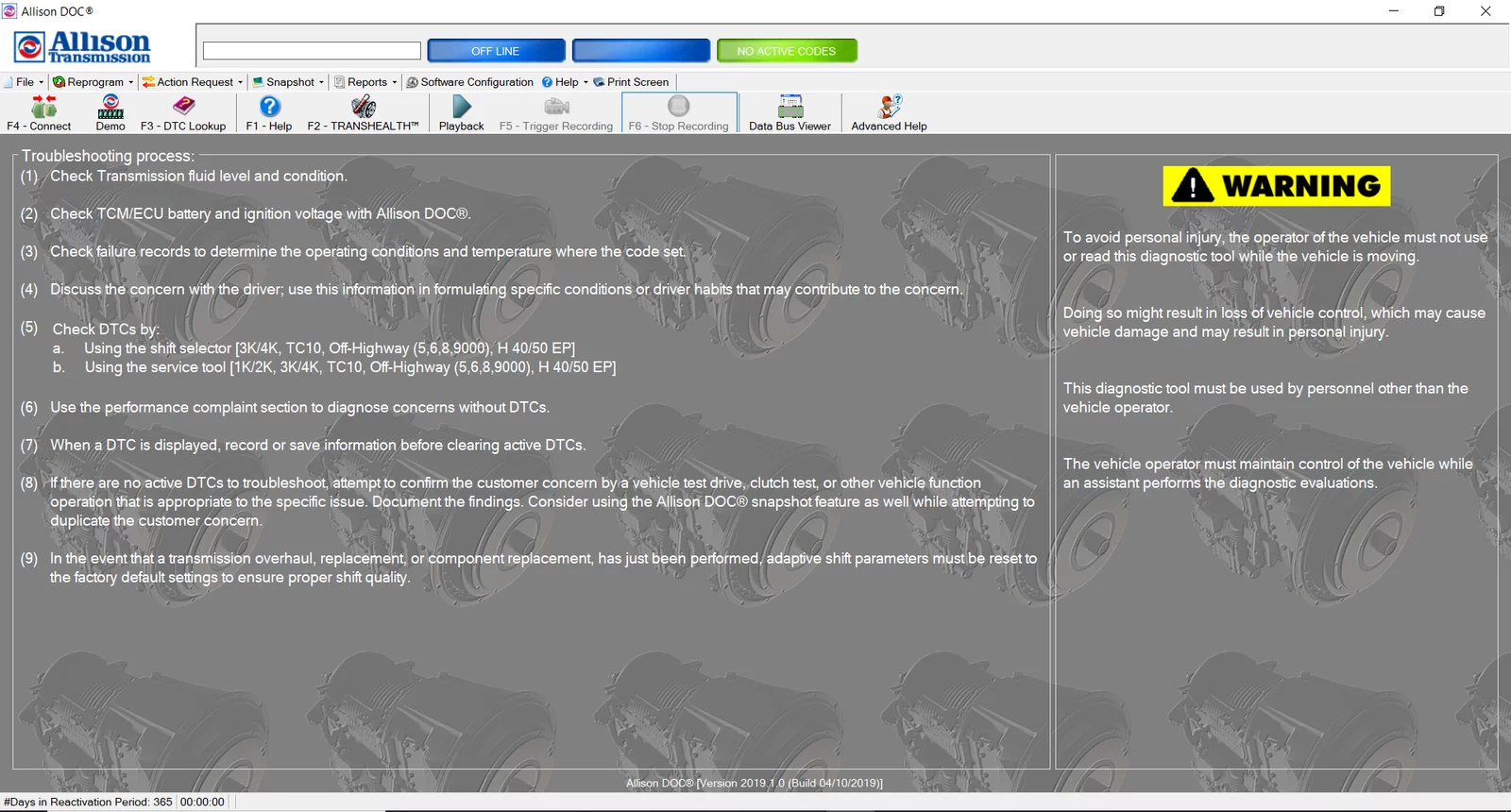



allison DOC 2019 Diagnostic Software: Essential Tool for Vehicle Maintenance
Allison DOC 2019 Diagnostic Software is a crucial tool for maintaining heavy machinery and trucks. It offers various features that enhance diagnostic capabilities, ensuring efficient vehicle performance. Installation is straightforward and can be completed via TeamViewer. The software streamlines the setup process, making it accessible for professionals in the automotive industry.
Table of Contents
ToggleFeatures and Capabilities of Allison DOC 2019
This diagnostic software brings state-of-the-art features tailored for heavy machinery and trucks, ensuring that technicians can address issues swiftly and effectively.
One notable capability is its real-time data access. Technicians can retrieve critical information within seconds, which is invaluable when immediate action is required to minimize vehicle downtime.
The software is engineered for comprehensive diagnostic checks. It includes guided troubleshooting procedures that enable users to identify and resolve common problems efficiently. This structured approach to diagnostics helps maintain high standards of service and operational reliability.
Compatibility is another significant advantage. The Allison DOC 2019 supports not only Allison transmission systems but also a broad spectrum of commercial vehicles. This versatility makes it a preferred choice among various service workshops, granting technicians the flexibility to work across different models without needing multiple software solutions.
Update capabilities are integral to the software’s performance. Users have access to the latest updates directly from the software interface, ensuring that they are always equipped with the most current information regarding various transmission models. This feature is crucial for maintaining accuracy and effectiveness in diagnostics.
The user interface of Allison DOC 2019 has been designed with simplicity in mind. Its intuitive layout streamlines the user experience, making it accessible for technicians who may not be acquainted with advanced technology. Training requirements are minimal, allowing for quick adaptation in busy workshop environments.
- Real-time data access for swift issue resolution
- Guided troubleshooting procedures for efficient diagnostics
- Wide compatibility with Allison and non-Allison vehicles
- Direct access to software updates for accurate diagnostics
- Intuitive user interface that enhances usability
All these features combine to create a powerful tool that significantly enhances the diagnostic capabilities for servicing heavy machinery and trucks. The emphasis on efficiency and user-friendliness ensures that technicians can maximize their productivity while delivering high-quality service to their clients.
Installation and Setup Process
Setting up the software is essential for effective diagnostics in heavy machinery and trucks. The installation process has been streamlined for user convenience and efficiency.
The installation begins with downloading the software from the appropriate portal. This ensures that the most up-to-date version is being used, which is critical for accurate diagnostics. Users need to be mindful of the system requirements, which will be specified during the installation process.
Steps for Installation
- Download the Software: Access the download link for Allison DOC 2019 from the designated portal. This is the first step to obtaining the diagnostic tool.
- Run the Installer: Once the software is downloaded, execute the installation file. Follow the on-screen prompts carefully to ensure a smooth installation.
- Activation: After installation, it’s necessary to activate the software. This typically involves entering a code or using an account associated with the software.
- Connecting to the Vehicle: For diagnostics, connect the equipment to the vehicle’s diagnostic port. Utilize the correct cables to facilitate a successful connection.
- Begin the Diagnostic Process: Launch the software and start the diagnostic procedures as guided by the application.
The setup can be conducted remotely, utilizing TeamViewer, which enhances accessibility for technicians in various locations. This remote capability allows for hands-on installation support, reducing downtime and facilitating immediate troubleshooting.
Proper installation is vital for harnessing the full potential of the diagnostic software. Following the structured steps will enable users to efficiently conduct diagnostics on their vehicles. A flawless setup not only boosts operational efficiency but also prolongs the lifespan of heavy-duty machinery.
Throughout the installation process, users must ensure that any prompts are addressed promptly and that the software is kept updated through regular checks for new versions. This ensures optimal performance during equipment diagnostics.
Practical Applications and Use Cases
The Allison DOC 2019 Diagnostic Software finds its usefulness across various sectors in the automotive and heavy machinery industries. Its capabilities extend beyond basic diagnostics, enabling technicians to address complex issues efficiently.
This software is particularly valuable in fleet management. Fleet operators can utilize it to monitor the performance and health of multiple vehicles in real time. By identifying issues early, they can reduce downtime and optimize maintenance schedules. This proactive approach leads to significant cost savings and enhances overall operational efficiency.
The software also plays a critical role in repair shops. Technicians rely on its guided diagnostic procedures to pinpoint problems quickly, which streamlines the repair process. The ability to reprogram control units for both the transmission and engine ensures that repairs meet manufacturer specifications, ultimately improving vehicle reliability.
Another notable application is in preventive maintenance. The Allison DOC 2019 provides data that helps technicians predict when maintenance should be performed. This can prevent unexpected breakdowns, which are typically costly. By regularly using the software for diagnostics, shops can establish a reputation for thorough, reliable service.
- Real-time monitoring of vehicle performance for fleet operators.
- Streamlined repairs with guided diagnostic procedures.
- Efficient reprogramming of control units for optimal vehicle performance.
- Enhanced preventive maintenance to prevent costly breakdowns.
In the construction industry, where heavy machinery operates under extreme conditions, the Allison DOC 2019 aids in ensuring that vehicles are always in top condition. Its diagnostics tools help maintain essential machinery such as excavators and dump trucks, thereby supporting project timelines and ensuring safety on construction sites.
Ultimately, the software serves as a comprehensive tool for various applications, taking diagnostics and maintenance practices to the next level. Its integration into everyday operations not only elevates efficiency but also sets a new standard for service quality in the automotive and heavy equipment sectors.