TRUCK SOFTWARE






 CLAAS
CLAAS CNH
CNH





 HITACHI


 JPRO
JPRO KUBOTA
 MAGIC TUNER
 MANITOU
 NEXIQ
NEXIQ NONSELF
 PACCAR


 PSI POWERLINK







 ZF TESTMAN



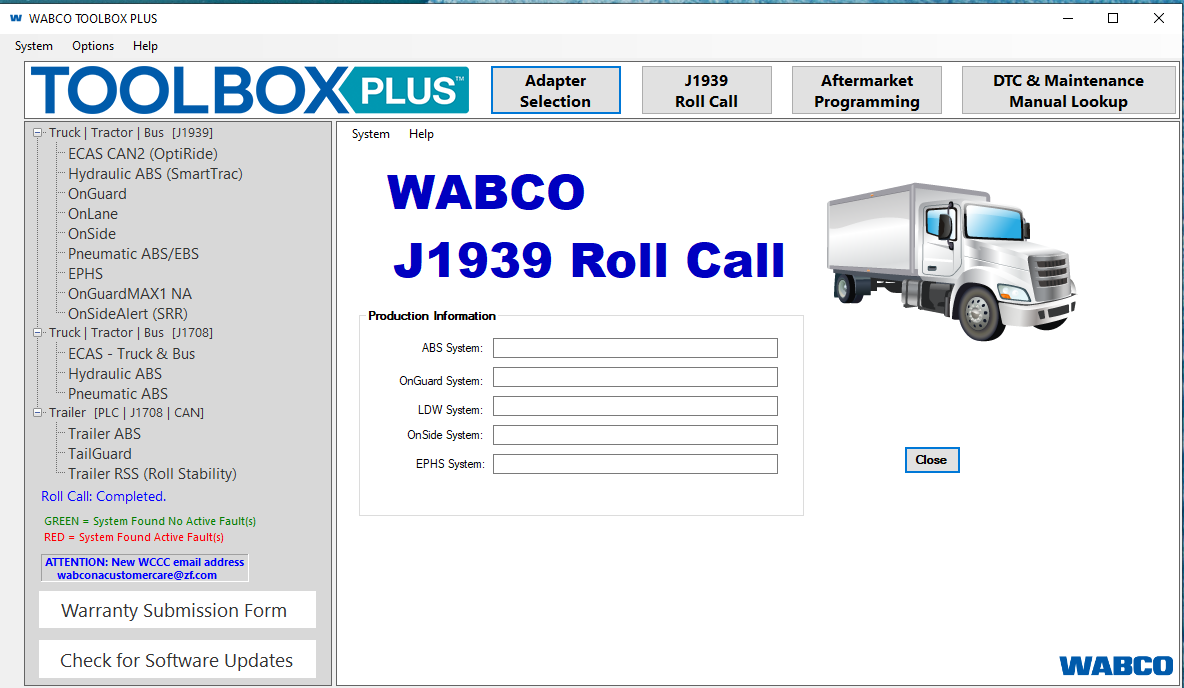


Wabco Toolbox Plus 14 2024: Essential Diagnostic Software for Heavy Trucks
Wabco Toolbox Plus 14 2024 is a diagnostic software designed for heavy trucks and machinery. It streamlines the management and troubleshooting of vehicle systems, enhancing efficiency for maintenance professionals. The software includes advanced diagnostic capabilities, user-friendly navigation, and support for various vehicle types. Regular updates ensure compatibility with new models and improved functionalities, making it a valuable tool in the automotive industry.
Table of Contents
ToggleOverview of Wabco Toolbox Plus 14 2024
This section provides insights into Wabco Toolbox Plus 14 2024, highlighting its purpose, functionality, and relevance in today’s automotive industry.
Purpose and Functionality
The primary aim of Wabco Toolbox Plus 14 2024 is to streamline vehicle diagnostics and enhance maintenance processes. This software is instrumental in managing various vehicle systems, enabling technicians to troubleshoot issues efficiently. Its robust features allow for real-time access to critical vehicle data and help in making informed maintenance decisions.
Industry Relevance
In the fast-paced automotive sector, Wabco Toolbox Plus 14 2024 is a vital tool for professionals. The increasing complexity of vehicle systems necessitates advanced diagnostic solutions. This software plays a significant role in ensuring safety, improving operational efficiency, and reducing costly downtime for heavy machinery and trucks.
Key Features of Wabco Toolbox Plus 14 2024
This section highlights the essential functionalities that elevate the Wabco Toolbox Plus 14 2024 as a premier diagnostic tool in the automotive sector. Each feature contributes to streamlined diagnostics, improved efficiency, and enhanced user experience.
User-Friendly Interface
An intuitive interface simplifies navigation, allowing users of various skill levels to operate the software effectively. The design prioritizes accessibility and efficiency, ensuring technicians can quickly find the tools and information they need.
Navigation Enhancements
Optimized navigation features enhance user experience, facilitating seamless transitions between functions. This improvement minimizes training time and increases productivity.
Expanded Compatibility
The software supports a wide range of vehicles, making it versatile for various automotive needs. This extensive compatibility ensures that users can cater to diverse fleets efficiently.
Supported Vehicle Types
- Heavy-duty trucks
- Commercial vehicles
- Different manufacturer models
Advanced Diagnostic Capabilities
Providing high-precision diagnostics, this feature allows for quick identification of issues. By analyzing error codes, technicians gain crucial insights into vehicle performance.
Error Code Analysis
Robust error code analysis expedites the troubleshooting process, leading to faster repairs and reduced vehicle downtime.
System Faults Detection
Automatic detection of system faults enhances vehicle reliability. This capability aids in preemptively addressing issues that could lead to significant failures.
Practical Applications in Maintenance and Repair
The Wabco Toolbox Plus 14 2024 serves numerous practical applications within maintenance and repair, enhancing the overall workflow for mechanics and technicians.
Brake System Diagnostics
This software plays a crucial role in diagnosing brake systems, which are vital for vehicle safety. The advanced diagnostic tools help in identifying specific issues effectively.
Monitoring and Reporting
Consistent monitoring of brake system performance can prevent accidents and ensure compliance with safety regulations. Reporting features allow technicians to generate detailed reports on system health, aiding in informed decision-making for repairs.
Predictive Maintenance Strategies
Implementing predictive maintenance strategies is facilitated by the software’s ability to analyze data trends. This proactive approach helps in anticipating potential failures before they become critical, thereby reducing emergency repair costs.
Continuous Training Opportunities
Training is vital in adapting to new technologies. The Wabco Toolbox Plus includes educational modules that support continuous learning for technicians, ensuring they remain current on best practices and emerging automotive technologies.
Remote Interaction Capabilities
Remote interaction features allow technicians to diagnose and troubleshoot issues without needing the vehicle on-site. This capability enhances support and minimizes downtime, proving essential in urgent situations.
Benefits of Using Wabco Toolbox Plus 14 2024
This software provides numerous advantages that significantly enhance maintenance practices and operational efficiency in the heavy vehicle industry.
Diagnostic Efficiency
Speed and accuracy in diagnostics are crucial. The software reduces downtime by enabling faster identification of issues, allowing vehicles to return to service more quickly. This efficiency translates into better fleet availability and minimized disruption in operations.
Informed Decision Making
Access to precise and comprehensive data enables technicians to make educated decisions regarding repairs and maintenance. With a clear understanding of vehicle conditions, fleets can prioritize critical tasks and optimize maintenance schedules effectively.
Cost Reduction Advantages
The use of advanced diagnostic tools leads to substantial cost savings. Early problem detection prevents minor issues from escalating into major repairs, thereby reducing overall maintenance costs. Efficient diagnostics also lower the risks associated with unforeseen breakdowns.
Fleet Integration Simplification
For companies operating diverse vehicle fleets, this software simplifies management by supporting various models and brands. This capability streamlines processes and enhances tracking of vehicle statuses, leading to improved operational cohesion.
Understanding the system requirements and installation process is essential for effectively using the software. Below are the necessary specifications and steps for installation.
System Requirements and Installation
Software Installation via TeamViewer
The installation of Wabco Toolbox Plus 14 2024 can be efficiently carried out using TeamViewer. This remote access tool allows technicians to connect directly to the user’s system, facilitating a seamless installation process. Users need to ensure that TeamViewer is installed and operational on their device before initiating the installation.
Hardware Compatibility
To run Wabco Toolbox Plus 14 2024 smoothly, the following hardware specifications are recommended:
- Minimum of 4 GB RAM
- Dual-core processor or higher
- At least 10 GB of free hard drive space
- Dedicated graphics card for optimal performance
- USB ports for connection with diagnostic tools
User Access and Initial Setup
After installation, users need to set up their access permissions within the software. This will involve creating user profiles and assigning roles as necessary. Additionally, initial configuration settings should be adjusted to suit specific vehicle types and diagnostic needs. Familiarization with the interface will enhance user experience and efficiency.