TRUCK SOFTWARE






 CLAAS
CLAAS CNH
CNH





 HITACHI



 JPRO
JPRO KUBOTA
 MAGIC TUNER
 MANITOU
 NEXIQ
NEXIQ NONSELF
 PACCAR


 PSI POWERLINK







 ZF TESTMAN



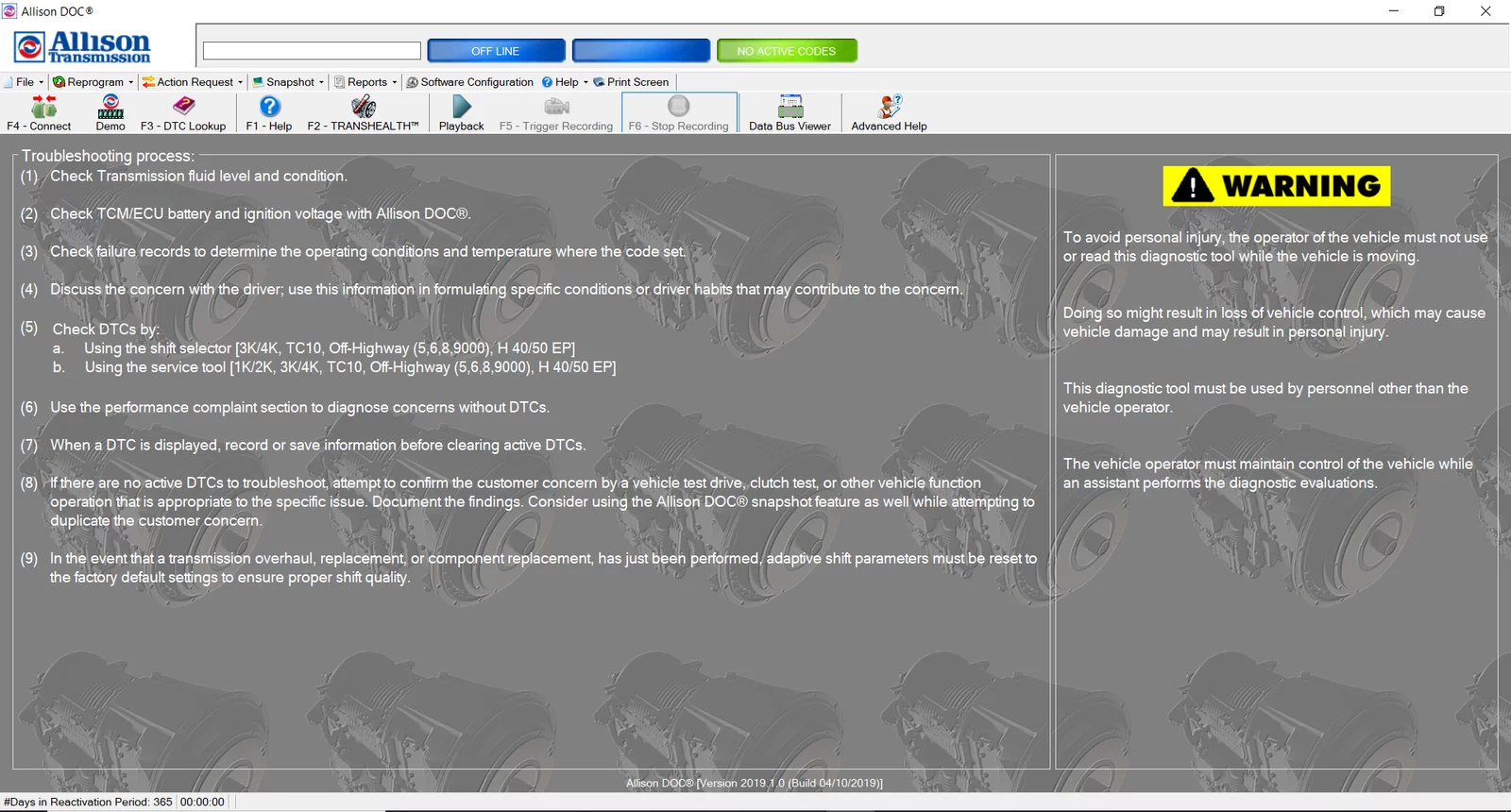



allison DOC Diagnostic Software 2023 v3 is a specialized tool for diagnosing and maintaining Allison transmissions. It provides users with an efficient way to access critical data and troubleshoot issues effectively. The software is compatible with various vehicle systems, allowing seamless integration with heavy machinery and trucks. Its advanced features enhance diagnostic capabilities, streamlining the maintenance process for technicians.
Table of Contents
ToggleOverview of Allison DOC Diagnostic Software 2023 v3
This software package represents a comprehensive toolset designed for the effective management of Allison transmission systems.
Key Features and Benefits
It offers a range of functionalities to enhance operational efficiency. Key features include:
- Real-time data analysis for rapid diagnostics.
- Intuitive interface ensuring ease of use.
- Robust troubleshooting tools that streamline the repair process.
Compatibility with Vehicle Systems
The software supports a variety of vehicle systems, ensuring versatility across applications.
Allison Transmissions
Designed specifically for Allison transmissions, it allows for in-depth monitoring and management.
Integration with Cummins Engines
Seamless integration with Cummins engines enhances the diagnostic accuracy across multiple systems.
Support for Volvo Vehicles
It is also compatible with a range of Volvo vehicles, broadening its application scope in the industry.
Diagnostic Capabilities and Functionalities
The Allison DOC Diagnostic Software offers robust diagnostic capabilities, enhancing the efficiency of vehicle maintenance through advanced functionalities.
Real-time Data Analysis
This feature allows technicians to monitor essential data instantly, leading to more precise diagnostics and timely interventions.
Data Bus Viewer
The Data Bus Viewer provides a visual representation of data flow. It enables users to identify communication faults between the control module and other vehicle components, making diagnosis easier.
Performance Metrics Monitoring
With performance metrics monitoring, users can track critical operational parameters. This functionality aids in maintaining optimal performance and ensuring that the vehicle adheres to necessary standards.
Troubleshooting Tools
A suite of troubleshooting tools enhances the diagnostic process, allowing for efficient identification and resolution of issues that may arise.
DTC Lookup and Solutions
The DTC Lookup feature offers swift access to diagnostic trouble codes. This functionality connects users to specific solutions, facilitating faster repairs.
SmartConnect Technology
SmartConnect automatically detects configuration requirements for communication between the software and the vehicle. This feature simplifies the connection process, reducing troubleshooting time significantly.
Advanced Configuration Options
Configuring the Allison DOC software for optimal use involves a series of advanced options. These features are designed to empower technicians by providing comprehensive control over transmission settings.
Reprogramming Control Units
This capability allows for adjustments necessary to enhance performance. Within this category, it’s possible to recalibrate various electronic modules, ensuring they operate at peak efficiency.
Electronic Control Unit (ECU) Calibration
Fine-tuning the ECU is critical for achieving desired vehicle performance. Calibration involves modifying several parameters that govern how the transmission interacts with the vehicle’s engine and drivetrain.
5th Generation TCM Adjustments
Making precise adjustments to the 5th Generation Transmission Control Module (TCM) can lead to significant improvements in shifting performance. This feature offers tailored tuning options to optimize gear shifting for specific driving conditions.
Customizable Settings
The software provides users with a selection of customizable options that enhance operational flexibility. Users can tailor configurations to meet the diverse needs of different vehicle models.
Parameter Reprogramming
Modifying transmission parameters is essential for vehicles with unique performance requirements. Technicians can reset or adjust settings to align with specific operational needs or preferences.
Adaptive Controls for Various Models
This feature enables the software to adapt to different vehicle models. By adjusting controls accordingly, technicians can ensure that the transmission system performs optimally regardless of the specific model.
Installation Process and Requirements
Installing the software is a straightforward process that ensures users can quickly get started with diagnostics and maintenance. The following sections detail the installation method and necessary system requirements.
Software Installation via TeamViewer
The Allison DOC Diagnostic Software can be installed efficiently using TeamViewer, a remote access tool that allows technicians to connect to the systems seamlessly. This method simplifies the installation process without the need for manual setups on each device.
System Requirements
To ensure smooth operation, specific system requirements must be met. It is vital that the hardware and software environments are compatible with the installed diagnostics program.
Compatible Hardware Specifications
- Windows 10 or higher operating system
- Minimum 8 GB RAM for optimal performance
- 250 MB of available disk space
- USB ports for diagnostics hardware connection
Internet Connectivity for Updates
A stable internet connection is essential for regular software updates, providing access to the latest features and enhancements. This connectivity also enables troubleshooting and remote support services, which can further streamline maintenance efforts.
Support and Training Resources
Comprehensive support and training resources are essential for maximizing the effectiveness of the software. Various tools and materials are available to assist users in becoming proficient with the system.
Integrated Help and Tutorials
A structured approach to learning the software contributes significantly to efficient usage. The integrated help features offer practical guidance.
Video Training Modules
Users have access to a series of video training modules, designed to provide step-by-step instructions on various functionalities. These visual aids can enhance understanding of complex features.
Interactive FAQs
Additionally, an interactive FAQ section addresses common questions and issues. This feature enables users to find quick answers, ensuring smoother operation and troubleshooting.
Technical Support and Maintenance
Robust technical support is vital for maintaining optimal performance. Several resources and services are available for users in need of assistance.
Access to Electronic Parts Catalogs
Users can access electronic parts catalogs to facilitate repairs and maintenance procedures. This resource simplifies the process of sourcing necessary components.
Regular Software Updates and Improvements
Staying current with software updates is crucial for ensuring that all features function correctly. Regular updates enhance software performance and introduce new functionalities.
Compliance and Standards
Ensuring compliance and adherence to industry standards is crucial for any diagnostic software, especially in the automotive sector. The following sections highlight the specific regulations and safety features that the software upholds.
Adherence to Industry Regulations
The software aligns with established industry best practices and regulations to ensure its effectiveness and reliability. Compliance includes:
- Following guidelines set forth by the TMC (Technical Maintenance Council).
- Meeting the standards established by SAE (Society of Automotive Engineers).
- Implementing protocols that enhance performance and safety during diagnostic processes.
Safety and Security Features
Integrating robust safety and security measures is a priority to protect both user data and vehicle systems. Key features include:
- Data encryption to safeguard sensitive information.
- Regular security updates to address potential vulnerabilities.
- Compliance with safety standards to minimize risks during operation.
Allison transmission diagnostic software
| Feature | Description | Benefits |
|---|---|---|
| Real-time Diagnostics | Provides instant access to diagnostic information from Allison transmissions. | Allows for quick identification of issues, reducing downtime and repair costs. |
| Fault Code Retrieval | Enables retrieval of fault codes to diagnose transmission problems. | Facilitates targeted repairs by providing specifics on failures. |
| Performance Monitoring | Tracks the performance metrics of the transmission system. | Helps optimize the operation and efficiency of heavy machinery. |
| Software Updates | Regular updates to ensure compatibility and include the latest features. | Keeps the diagnostic tools up-to-date with the latest transmission technologies. |
| User-Friendly Interface | Designed for intuitive navigation and ease of use. | Makes it accessible for technicians of all skill levels. |
| Data Logging | Records performance data over time for analysis. | Provides insights into long-term trends and maintenance needs. |
| Compatibility | Supports a wide range of Allison transmission models. | Ensures versatility and usefulness across different machinery types. |