TRUCK SOFTWARE






 CLAAS
CLAAS CNH
CNH





 HITACHI



 JPRO
JPRO KUBOTA
 MAGIC TUNER
 MANITOU
 NEXIQ
NEXIQ NONSELF
 PACCAR


 PSI POWERLINK







 ZF TESTMAN



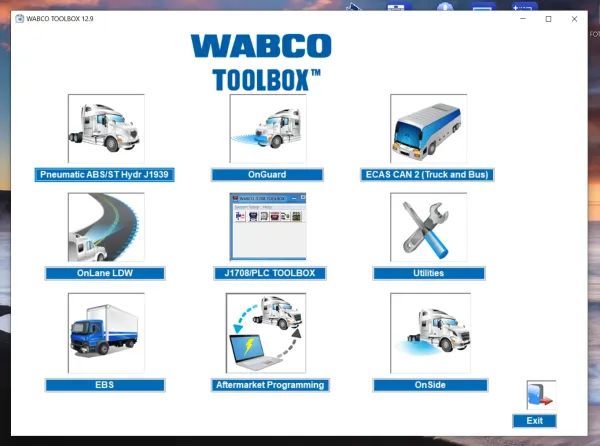



Meritor Wabco Tool Box 12.9.1: Advanced Diagnostic Software for Trucks and Heavy Equipment
The Meritor Wabco Toolbox 12.9.1 is a specialized diagnostic tool for heavy trucks and machinery. It provides advanced functionalities for assessing ABS systems, enabling quick and accurate troubleshooting. This software enhances efficiency and safety in vehicle maintenance. By utilizing user-friendly features, technicians can effectively diagnose issues and access essential service information. Its installation can be easily completed via TeamViewer for convenience.
Table of Contents
ToggleUnderstanding Meritor Wabco Toolbox 12.9.1
This section provides insights into the Meritor Wabco Toolbox 12.9.1, focusing on its functionality and key features.
Purpose and Functionality
The primary goal of this toolbox is to enhance the diagnostic capabilities for vehicles equipped with ABS systems. It serves as a vital resource for technicians, allowing for efficient problem identification and resolution. By integrating advanced technologies, the toolbox caters to the specific needs of heavy machinery and commercial trucks.
Key Features
Several standout features make the Meritor Wabco Toolbox 12.9.1 indispensable for vehicle maintenance.
User Interface
The toolbox boasts an intuitive user interface, designed to streamline navigation. Technicians can easily access various functions, improving workflow and reducing the time needed for diagnostics.
Real-Time Diagnostics
Real-time diagnostics capabilities enable users to assess the status of vehicle components dynamically. This feature is critical for verifying operations and ensuring vehicle safety during maintenance checks.
Fault Management
Effective fault management allows for quick identification and categorization of issues. The toolbox displays ongoing errors and offers detailed insights, which help technicians make informed decisions on repairs and replacements.
Benefits of Using Meritor Wabco Toolbox
This diagnostic tool significantly enhances the maintenance and operational aspects of heavy trucks, providing a range of benefits that improve overall fleet performance.
Efficiency and Time-Saving
The Meritor Wabco Toolbox streamlines the diagnostic process, allowing technicians to identify issues swiftly. With its user-friendly interface and real-time data access, extensive time is saved during troubleshooting, leading to faster repairs and reduced vehicle downtime.
Enhanced Safety Measures
Improved diagnostics lead to safer operational conditions. By accurately pinpointing problems within the ABS and braking systems, the toolbox ensures that trucks operate at optimal safety levels. This proactive approach can prevent accidents caused by brake failures or system malfunctions.
Cost-Effectiveness
Utilizing this diagnostic tool helps in minimizing repair costs. Accurate fault identification reduces the need for unnecessary repairs, ensuring that resources are used efficiently. Fleet operators can experience substantial savings by maintaining their vehicles with targeted interventions rather than trial-and-error fixes.
How to Install and Set Up Meritor Wabco Toolbox
Installing and configuring the Meritor Wabco Toolbox is essential for effective diagnostics. This section outlines the necessary steps to get the software up and running smoothly.
Installation Process
The installation involves several straightforward steps to ensure compatibility and optimal performance.
System Requirements
Before installation, verify that the system meets the following requirements:
- Operating System: Windows 10 or later
- RAM: Minimum 4 GB
- Hard Disk Space: At least 2 GB free space
- USB Port: Required for adapter connection
Installation via TeamViewer
Utilizing TeamViewer simplifies the installation process. This method allows remote access for quicker setup and configuration. Follow the screen prompts during installation to complete the process efficiently.
Connecting to Vehicles
Establishing a connection between the toolbox and the vehicle is vital for diagnosis.
Adapter Compatibility
The toolbox supports various adapters that conform to the RP1210A standard. Ensure that the correct adapter is selected to guarantee an effective connection to the vehicle.
Protocol Selection
After connecting the adapter, select the appropriate communication protocol, such as J1708 or PLC, from the main menu to initiate communication with the vehicle’s systems.
Diagnostic Capabilities and Procedures
Effective diagnostics are crucial for maintaining the performance and safety of heavy machinery. The Meritor Wabco Toolbox provides a suite of capabilities focused on various systems.
ABS Diagnostics
The system offers comprehensive ABS diagnostics that enable technicians to identify and address issues promptly. Users can access fault codes, real-time data, and operational status indicators, facilitating efficient problem resolution. Key features include:
- Viewing active and stored fault codes
- Performing fault code resets
- Getting diagnostic reports for maintenance logs
Pneumatic and Hydraulic Systems
In addition to ABS functionalities, this software addresses pneumatic and hydraulic systems. It helps pinpoint complications that might affect braking performance. Essential functions include:
- Monitoring air supply levels and pressure
- Examining hydraulic fluid conditions
- Running tests on pneumatic components for leaks and integrity
Real-Time Component Activation
The ability to activate components in real time plays a critical role in diagnostics. This feature not only confirms proper functionality but also allows for hands-on testing of various parts. Technicians can:
- Engage valves and sensors
- Test the responsiveness of brake systems
- Ensure that all components operate as intended under load
FAQs About Meritor Wabco Toolbox
This section addresses frequently asked questions related to the Meritor Wabco Toolbox, providing insights into common problems and accessing helpful documentation.
Troubleshooting Common Issues
When using the Meritor Wabco Toolbox, users may encounter various issues. Key troubleshooting tips include:
- Ensure the software is updated to the latest version for optimal performance.
- Check compatibility of the adapter with the vehicle model.
- Verify proper connection to the vehicle’s diagnostic port.
- Restart both the software and vehicle systems if communication errors occur.
- Consult the error codes displayed for additional guidance.
Accessing Service Manuals
Service manuals are essential for effective troubleshooting and repair processes. Users can access relevant documentation through the Meritor Wabco Toolbox interface. Steps include:
- Navigating to the “Information” or “Help” section within the software.
- Selecting the appropriate manual based on the vehicle type and system components.
- Printing or saving manuals for offline reference if needed.
There are several related products that enhance the functionality and compatibility of the Meritor Wabco Toolbox. These tools provide essential support for heavy machinery diagnostics, ensuring a comprehensive solution for vehicle maintenance.
Related Products
Diagnostic Software for Heavy Trucks
This category includes various software solutions designed for the robust diagnosis of heavy trucks. These programs assist technicians in identifying issues quickly, ultimately boosting overall efficiency in operations.
John Deere and Paccar Compatibility
Compatibility with John Deere and Paccar vehicles expands the versatility of diagnostic tools available. This integration allows users to perform seamless diagnostics across different brands, providing a comprehensive maintenance solution.
Online Parts Catalog Options
A range of online parts catalogs is available, offering easy access to necessary components for repairs and maintenance. Users can find detailed specifications and part numbers essential for efficient service.
Purchasing and Downloading the Software
Acquiring the software is a straightforward process that ensures users can access the latest diagnostic tools efficiently. After completing the purchase, users have various options for downloading the software quickly and securely.
After Payment Process
Once the payment has been successfully processed, users will receive a confirmation notification. This typically includes details on how to access the software. The entire transaction is designed for user convenience, allowing for immediate progression to the next steps.
Instant Download Options
- The software is made available for direct download, enabling users to bypass any delays.
- Activation codes and user guides are provided alongside the download link, streamlining the installation process.
- Users can download the software from any compatible device, ensuring accessibility wherever needed.
Features of the Latest Version
The most recent version includes various enhancements aimed at improving user experience and diagnostic capabilities. Notable features are:
- Improved user interface for easier navigation.
- Expanded diagnostic tools for additional vehicle systems.
- Faster real-time data processing for immediate feedback.
- Enhanced compatibility with more vehicle models and systems.