TRUCK SOFTWARE






 CLAAS
CLAAS CNH
CNH




 HITACHI



 JPRO
JPRO KUBOTA
 MAGIC TUNER
 MANITOU
 NEXIQ
NEXIQ NONSELF
 PACCAR


 PSI POWERLINK







 ZF TESTMAN



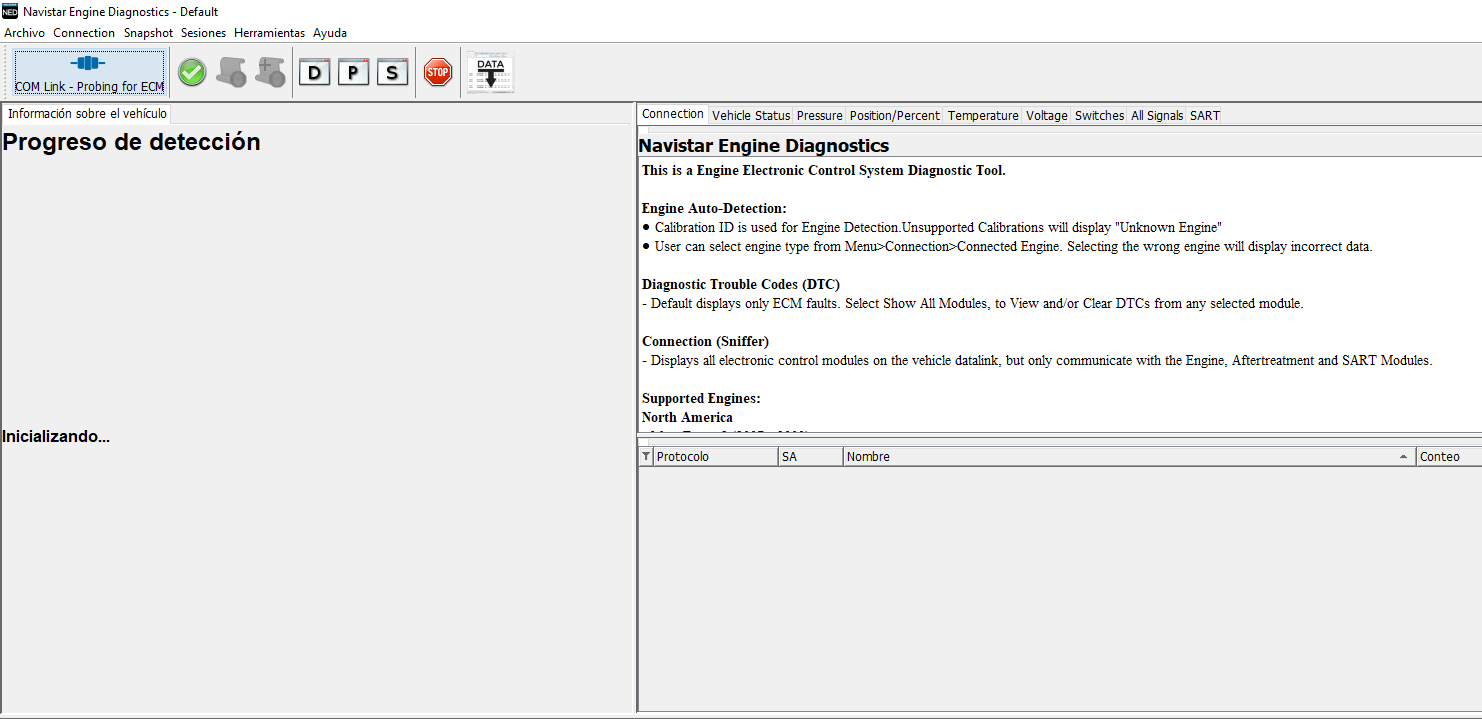


NAVISTAR ENGINE DIAGNOSTICS NED 2026: Revolutionizing Engine Diagnostics and Programming
Navistar Engine Diagnostics NED 2026 is a specialized software tool designed for diagnosing and programming Navistar engines. It provides essential functionality for technicians working with heavy machinery and trucks. This software supports real-time engine monitoring, diagnostic trouble code retrieval, and parameter adjustments. The installation process is facilitated through TeamViewer, ensuring efficient setup and support for users.
Table of Contents
ToggleOverview of Navistar Engine Diagnostics NED
This section provides an in-depth understanding of Navistar Engine Diagnostics NED, detailing its objectives, compatibility, and supported technologies.
Purpose and Scope of the Software
The primary aim of Navistar Engine Diagnostics NED is to streamline the diagnostic and programming processes for Navistar engines. It serves as a critical resource for service technicians, enabling them to efficiently identify issues and enhance engine performance. The software covers a broad range of functionalities tailored for maintenance and repair, ensuring that users can meet the demands of diverse service environments.
Compatibility with Navistar® Engine Systems
Designed with a deep understanding of Navistar’s engineering framework, this software is fully compatible with various Navistar engine systems. It seamlessly integrates with electronic control units (ECUs) and other crucial components to provide optimal diagnostic capabilities. As a result, mechanics can effectively service engines across different models without compatibility concerns, thus ensuring versatile application in fieldwork.
Supported Engine Models and Technologies
This software supports a multitude of Navistar engine models, encompassing the latest technologies and traditional powertrains. It is adept at servicing engines that comply with advanced emission standards, contributing to environmental sustainability. The supported models often include:
- MaxxForce® Engines
- Navistar® Power Solutions
- ProStar® Engine Series
- International® Truck Models
The inclusion of these engine variants ensures comprehensive coverage, enabling shops to handle an extensive range of vehicles efficiently. Through continuous updates, the software remains relevant with advancements in engineering and technology, guaranteeing that users are equipped to support emerging engine models.
Key Features of the NED Diagnostic Tool
The NED diagnostic tool is equipped with advanced functionalities that enhance the efficiency and accuracy of engine diagnostics. These key features provide technicians with the capabilities needed for effective maintenance and troubleshooting.
Real-Time Engine Monitoring
Real-time engine monitoring allows technicians to track the performance of Navistar engines as it operates. This feature provides live data on a variety of engine parameters, enabling immediate detection of any abnormalities. By visualizing engine performance instantly, technicians can make quick decisions and adjustments, ultimately improving overall operational efficiency.
Diagnostic Trouble Code (DTC) Retrieval
The tool facilitates the retrieval of Diagnostic Trouble Codes (DTCs), which are essential for identifying issues within the engine system. Technicians can effortlessly access these codes to diagnose specific faults, streamlining the troubleshooting process. This capability significantly reduces downtime by ensuring that problems are addressed quickly and effectively.
Parameter Adjustment Capabilities
With parameter adjustment capabilities, technicians can modify engine settings to optimize performance based on operational requirements. This feature allows for fine-tuning of engine parameters, which is vital in adapting to various conditions such as load demands and environmental factors. Customization assures that engines perform at their best, enhancing reliability and efficiency.
Data Visualization and Graphing Tools
Data visualization and graphing tools play a crucial role in presenting engine data in an easily understandable format. These tools allow technicians to analyze changes over time, helping to forecast potential issues before they occur. By converting raw data into graphs and charts, technicians gain deeper insights into engine behavior, supporting more informed maintenance decisions.
Specialized Service Tests
NED includes specialized service tests designed to evaluate specific components of the engine system. These tests can pinpoint intermittent faults and assess the performance of actuators and sensors. By conducting these evaluations, technicians can ensure that every aspect of the engine is functioning optimally and proactively address any potential issues.
Software Updates and Expanded Coverage
Regular software updates ensure that the NED diagnostic tool stays aligned with emerging technologies and regulatory changes. This feature guarantees expanded coverage of newer engine models and systems, keeping technicians well-equipped for evolving diagnostic challenges. Continuous updates empower users to utilize the latest enhancements and maintain the highest standards in engine diagnostics.
Understanding the system requirements and installation process is crucial for seamless operation of the diagnostic software. Below are the essential specifications and instructions for installation.
System Requirements and Installation
Hardware Specifications
To ensure optimal performance of the diagnostic software, certain hardware specifications must be met. These specifications are designed to support robust functionality and efficiency.
Recommended Processor and RAM
- Processor: An Intel Core 2 Duo or an equivalent AMD Athlon X2 is recommended for efficient processing.
- Memory: A minimum of 2 GB of RAM is required for 32-bit versions, while 4 GB is necessary for 64-bit versions.
Storage and Disk Space Needs
Adequate storage is required to install and run the software effectively. A minimum of 300 MB of available disk space should be allocated for the software installation.
Supported Operating Systems
This diagnostic software is compatible with several versions of Windows. Supported operating systems include:
- Windows Vista
- Windows 7
- Windows 10 (64-bit is recommended)
Compatible Diagnostic Hardware
Connecting the software to the proper diagnostic hardware is essential for functionality. The system should utilize the most compatible hardware adapters.
Nexiq USB Link 3 Adapter Integration
The Nexiq USB Link 3 adapter is highly recommended for integration with the software. This adapter provides stable and reliable vehicle communication, essential for effective diagnostics.
Installation Process via TeamViewer
Installation can be performed remotely using TeamViewer, ensuring a straightforward setup process. This method allows for quick installation without the need for on-site presence.
Step-by-Step Remote Installation
During installation via TeamViewer, follow these general steps for successful setup:
- Initiate a remote session with a technician.
- Download and install necessary files as directed.
- Configure settings according to vehicle specifications.
Troubleshooting Installation Issues
If installation issues arise, several troubleshooting steps can be taken:
- Check hardware connections and compatibility.
- Ensure the correct versions of the software are being used.
- Consult technical support resources for additional guidance.
Navistar Engine Diagnostics vs. Competitors
When evaluating diagnostic tools, it is crucial to recognize the distinct advantages that Navistar Engine Diagnostics brings compared to its competitors. Many generic diagnostic tools cater to a wider array of vehicle brands but lack the depth of functionality specific to Navistar engines. The precision in diagnosing issues tied to Navistar’s proprietary systems allows for quicker resolution times and more effective maintenance strategies. This tool’s exclusive features tailored to Navistar’s specifications offer mechanics invaluable insights that generic tools may not provide.
Benefits of Brand-Specific Diagnostic Software
- Enhanced Accuracy: Tailored software ensures higher precision in readings and diagnosis, reducing the likelihood of erroneous interpretations.
- In-Depth Troubleshooting: Access to manufacturer-specific codes and data enables mechanics to address complex issues effectively.
- Continuous Updates: Regular updates aligned with current technologies ensure that the software remains relevant and functional.
- Streamlined Workflow: Technicians can work more efficiently due to the software’s specific design for Navistar engines, enhancing overall shop productivity.
Hardware Software Integration Differences
Integration is a crucial aspect when considering diagnostic tools. Navistar Engine Diagnostics integrates seamlessly with compatible hardware, such as the Nexiq USB Link 3 adapter. This integration allows for efficient data transfer between the engine’s control units and the diagnostic software. In contrast, many competitors may not support such specific hardware connections, potentially leading to data interpretation errors or longer diagnostic times.
Furthermore, brand-specific diagnostic tools often come equipped with advanced features that support proprietary hardware, providing a smooth operational experience. This integration distinguishes Navistar from generic diagnostic tools, ensuring that users have reliable access to real-time data and updates tailored for their engines.